general saas documentation
A structured reference for setup, architecture, integrations, and product modules in the general SaaS template. Use this as the implementation map for local development and feature customization.
Prerequisites
Verify these tools and accounts before starting local development.
External Services
Node.js 18+
Ensure you're using an LTS version (18 or 20) for the build engine.
Supabase
Required for Postgres database, Auth logic, and Storage buckets.
Clerk
Identity management provider for handling social auth and sessions.
Stripe
Payment processor for handling recurring billing and subscriptions.
Technical Proficiency
These technologies appear throughout the template and docs.
Next.js 14+
App Router & Server Components
TypeScript
Type-safe development flow
Tailwind CSS
Modern utility-first styling
PostgreSQL
Relational data management
Local Setup & Installation
Use this sequence to bootstrap the template and verify a working local environment.
Clone & Initialise
Download the codebase and enter the project directory to begin.
| 1 | git clone [repo-url] my-startup |
| 2 | cd my-startup |
Install Dependencies
Install project dependencies from package-lock.json.
| 1 | npm install |
Configure Environment
Create a local env file and add provider credentials.
| 1 | cp .env.example .env.local |
Launch Engine
Start the development server on localhost:3000.
| 1 | npm run dev |
Environment Variables
Securely manage your API keys, secrets, and public configuration across production and development.
The .env.local File
LaunchX uses a standard .env.local file for local development. This file is ignored by Git to ensure your secrets never leak into your repository.
Required Groups
- NEXT_PUBLIC_CLERK_*
Obtained from your Clerk Dashboard (Publishable + Secret Keys).
- NEXT_PUBLIC_SUPABASE_*
Your project URL and Anon/Service Role keys from Supabase project settings.
- STRIPE_SECRET_KEY / WEBHOOK_SECRET
Required for subscription syncing and secure payment processing.
Type Safety with Zod
LaunchX validates environment variables at runtime. Missing keys fail fast with explicit messages from the schema parser.
| 1 | // This logic is handled in src/lib/env.ts |
| 2 | export function getServerEnv() { |
| 3 | return serverSchema.parse(process.env); // Throws descriptive error if invalid |
| 4 | } |
Public vs Private
Variable names with the NEXT_PUBLIC_ prefix are accessible to the browser. Variables without this prefix are strictly hidden and only accessible to server-side code (API routes, Server components).
Project Architecture
LaunchX uses a layered architecture focused on type safety, predictable logic boundaries, and maintainable context for AI-assisted development.
| 1 | src/ |
| 2 | ├── app/ # Next.js App Router (Layouts, Pages, Server Components) |
| 3 | ├── components/ # Reusable UI & Atomic Parts (Tailwind + DaisyUI) |
| 4 | ├── config/ # Central App Control (Global configuration constants) |
| 5 | ├── lib/ # Stateless SDKs (Stripe, Resend, Supabase init) |
| 6 | ├── server/ # Critical Logic (State-modifying functions, SQL builders) |
| 7 | └── types/ # Database & App-wide TypeScript Interfaces |
| 8 | |
| 9 | supabase/ |
| 10 | └── migrations/ # SQL source of truth (Policies, Triggers, Views) |
| 11 | |
| 12 | .mex/ # AI Context Scaffold (Memory for Agents) |
| 13 | .cursorrules # System prompt for IDE (Rule enforcement) |
| 14 | CLAUDE.md # Workflow & Tech Map (Context loading) |
Directory Roles
src/server/
Contains state-changing business logic. Keep mutations here so behavior stays consistent across webhooks, scheduled jobs, and user actions.
src/app/
Handles routing, rendering, and data loading boundaries. Keep this layer focused on presentation and access orchestration.
supabase/migrations/
Defines schema, policies, and SQL-based constraints. Use migrations as the source of truth across local and production environments.
The AI Control Plane
These root-level files define repository context rules used by AI coding tools.
.cursorrules
Defines coding constraints such as fetch boundaries, naming conventions, and component expectations.
CLAUDE.md
Maps helper modules in src/lib and documents repeatable implementation patterns.
Security First
Auth and authorization are enforced with database policies (RLS), so data access remains restricted even if a client request path is bypassed.
Mex.
Mex is the context layer that keeps AI assistance aligned with your repository. It tracks structure, validates links, and flags documentation drift before it becomes an implementation issue.

The Scaffold Strategy
LaunchX ships with a dedicated .mex/ directory. Treat it as an operational index for AI context loading, not as user-facing product documentation.
The session entry point. Maps user tasks to specific architecture files.
Maintains cross-session state. Tells the AI what was finished and what's next.
Enforces your library choices (DaisyUI, Supabase) and prevents legacy code patterns.
Deterministic Drift Detection
The promexeus engine runs deterministic checks to keep context files synchronized with implementation changes.
Path Validation
Verifies that every file quoted in your docs actually exists on disk. Prevents AI from looking for deleted files.
Graph Integrity
Checks the internal links in .mex/ files. Ensures the AI can 'navigate' the documentation web without hits.
Orphan Detection
Identifies pattern files that aren't linked in the main index, ensuring all context is reachable.
Version Staleness
Signals if the codebase has changed significantly (via git log) since the context file was last updated.
CLI Core
Manage your agent memory via the terminal. The promexeus CLI is baked into LaunchX.
Check Project Health
Scans the entire scaffold for drift and outputs a 'Drift Score' (0-100).
| 1 | npx promexeus check |
Targeted Context Sync
Generates a focused prompt to update only the drifted scaffold segments.
| 1 | npx promexeus sync |
The Engineering Protocol
Keep context healthy by following the BUILD -> VERIFY -> GROW loop.
Build
Write code using the context from the .mex scaffold.
Verify
Run tests and linting to ensure technical correctness.
Grow
Update the .mex files with any new patterns or decisions made during the build.
Identity & Authentication
LaunchX uses Clerk for identity and session management, with server-side linkage to application data in Supabase.
The User Mirroring Pattern
Identity data is managed in Clerk, while product data is stored in Supabase. A sync layer keeps these models aligned.
Sign Up
User registers via Clerk components or provider redirects.
Webhook
Clerk fires a 'user.created' event to your /api/webhooks/clerk route.
Database Sync
The server layer creates a shadow row in the Supabase 'users' table.
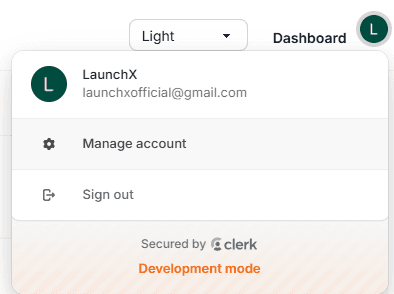
Edge-Level Protection
Routes are protected at the Edge to ensure zero-latency redirects for unauthenticated users.
| 1 | import { clerkMiddleware, createRouteMatcher } from "@clerk/nextjs/server"; |
| 2 | |
| 3 | const isProtectedRoute = createRouteMatcher([ |
| 4 | '/dashboard(.*)', |
| 5 | '/admin(.*)', |
| 6 | ]); |
| 7 | |
| 8 | export default clerkMiddleware((auth, req) => { |
| 9 | if (isProtectedRoute(req)) auth().protect(); |
| 10 | }); |
Universal Auth Helpers
Access the authenticated user safely across the entire stack using our standardized src/lib/auth.ts helpers.
getAuthUserId()
Retrieves the Clerk ID from the current session. Fast and edge-compatible.
| 1 | const userId = await getAuthUserId(); |
requireUser()
Enforces authentication and returns the full User Row from your database.
| 1 | const user = await requireUser(); |
| 2 | console.log(user.subscription_status); |
Social Auth Ready
Google, GitHub, and Magic Link can be enabled in Clerk. UI provider buttons follow your Clerk configuration.
Superadmin Engine
Central control surface for platform oversight. Managed via the /admin route with server-enforced access control.
The requireAdmin Protocol
Admin access is not determined by routes alone. LaunchX uses a server-side guard that verifies the is_admin flag against the Supabase source of truth before any data is rendered.
| 1 | export async function requireAdmin(): Promise<AdminUser> { |
| 2 | const authUserId = await getAuthUserId(); |
| 3 | if (!authUserId) redirect("/sign-in"); |
| 4 | |
| 5 | const supabase = createAdminClient(); |
| 6 | const { data: user } = await supabase |
| 7 | .from("users") |
| 8 | .select("is_admin") |
| 9 | .eq("clerk_id", authUserId) |
| 10 | .single(); |
| 11 | |
| 12 | if (!user?.is_admin) redirect("/dashboard"); |
| 13 | return user as AdminUser; |
| 14 | } |
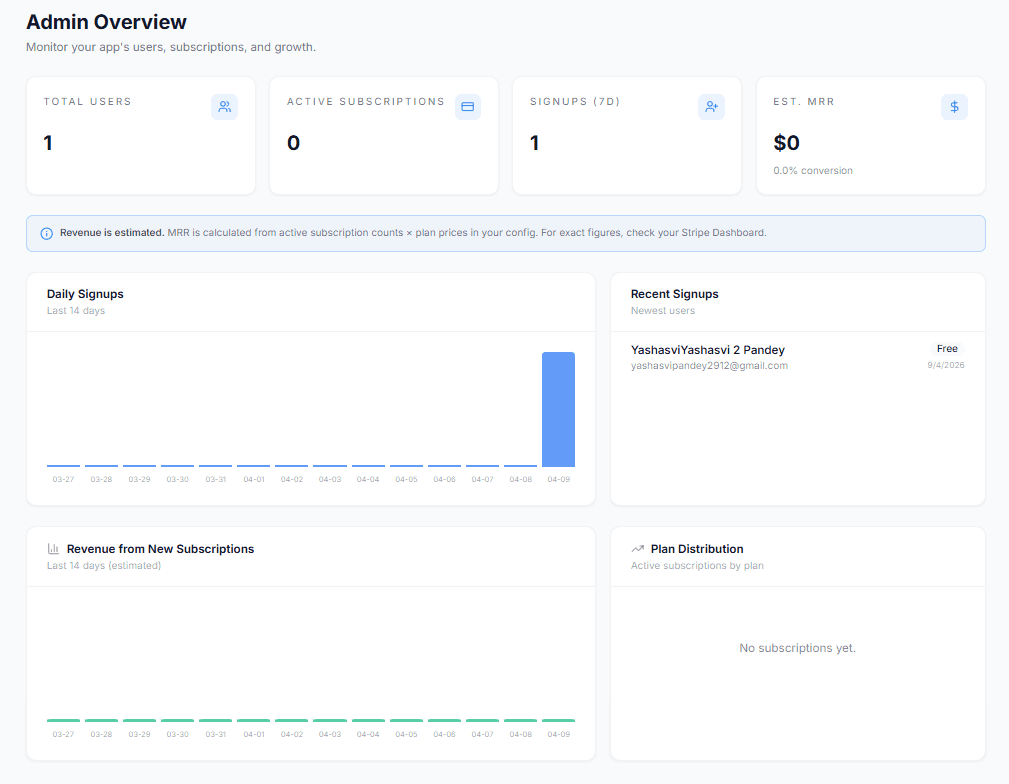
Engine Capabilities
User Impersonation
View the dashboard exactly as a specific user sees it to debug issues.
Subscription Overrides
Manually grant Life-time access or extend trials for enterprise leads.
Platform Metrics
Real-time visibility into MRR, Churn, and Active User counts.
Global Broadcast
Send platform-wide notifications or maintenance alerts.
Granting Admin Privileges
For security reasons, there is no "Make Admin" button in the UI. Admins must be promoted directly in the Supabase Dashboard by setting the is_admin column to true.
Supabase & RLS
LaunchX uses Supabase with PostgreSQL and Row Level Security (RLS) for policy-driven data access control.
The Dual-Client Pattern
We separate database access into two distinct patterns to prevent "Privilege Escalation" — ensuring the UI only sees what it's allowed to see.
Browser Client
Uses the Anon Key. Strictly governed by RLS. Safe for use in Client Components.
| 1 | const supabase = createBrowserClient(); |
| 2 | const { data } = await supabase |
| 3 | .from('profiles') |
| 4 | .select('*'); |
Admin Engine
Uses the Service Role Key and bypasses RLS. Restrict to server-side execution only.
| 1 | const admin = createAdminClient(); |
| 2 | // System-level override |
| 3 | await admin.from('users') |
| 4 | .update({ is_admin: true }); |
RLS: The First Line of Defense
Security policies are stored as SQL in supabase/migrations/. This ensures that even if a hacker captures an API request, the database will reject the query if it doesn't match the owner.
| 1 | -- Only the owner can view their own profile |
| 2 | CREATE POLICY "Users can view own profile" |
| 3 | ON public.profiles |
| 4 | FOR SELECT |
| 5 | USING (auth.uid() = clerk_id); |
The Migration Workflow
LaunchX is built for professional workflows. Never edit tables in the Dashboard UI. Use the CLI to track changes.
npx supabase startStart a local Postgres instance.
npx supabase db diffGenerate a new migration file.
npx supabase db pushApply changes to production.
Strongly Typed Database
LaunchX includes a generate-types script that introspects your Supabase schema and creates a src/types/database.ts file. This gives you full Autocomplete and Type Safety across your entire data layer.
| 1 | npm run db:types |
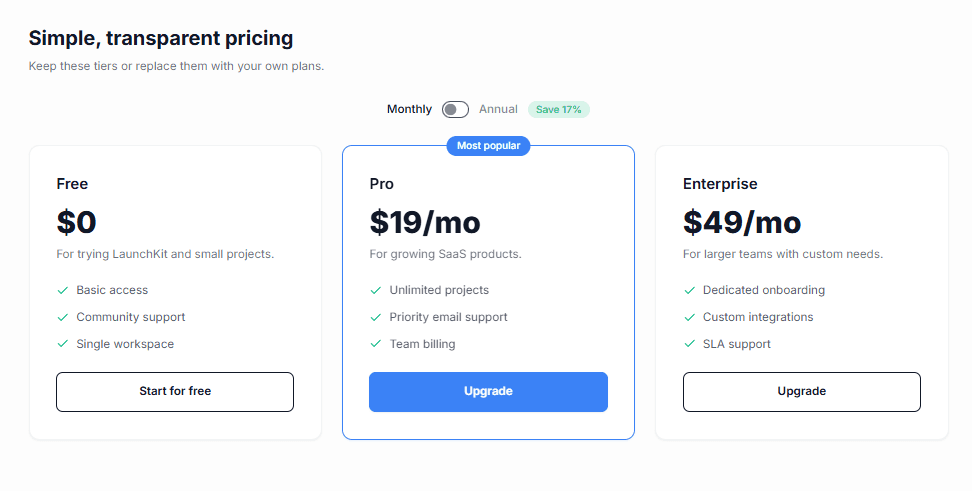
Payments & Subscriptions
LaunchX supports Stripe and Lemon Squeezy through a shared subscription model and provider-specific webhook handlers.
Multi-Provider Core
The template is architected to be payment-agnostic. All subscriptions are normalized into a single subscriptions table, regardless of the vendor.
Stripe SDK
Native integration with Stripe Checkout and the Billing Portal. Handles Tax, Coupons, and Metered billing.
Lemon Squeezy
The Merchant of Record (MoR) solution. Handles VAT, global compliance, and payouts automatically.
Webhook Security & Reliability
Payment state is synchronized via cryptographically signed webhooks. LaunchX enforces strict signature verification to prevent spoofing.
| 1 | import { stripe } from "@/lib/stripe"; |
| 2 | |
| 3 | export async function POST(req: Request) { |
| 4 | const body = await req.text(); |
| 5 | const signature = req.headers.get("stripe-signature") as string; |
| 6 | |
| 7 | // High-Security Verification |
| 8 | const event = stripe.webhooks.constructEvent( |
| 9 | body, |
| 10 | signature, |
| 11 | process.env.STRIPE_WEBHOOK_SECRET! |
| 12 | ); |
| 13 | |
| 14 | // Atomic DB Sync |
| 15 | await upsertSubscription(event.data.object); |
| 16 | return jsonSuccess(); |
| 17 | } |
The Pricing Protocol
Do not hardcode provider price IDs in UI components. Keep all mappings in config/config.ts.
Use stripe listen --forward-to localhost:3000/api/stripe/webhook during local development to test signature verification and subscription sync.
Billing & Subscriptions
Complete subscription life-cycle management including plan switching, invoicing, and secure payment method updates.
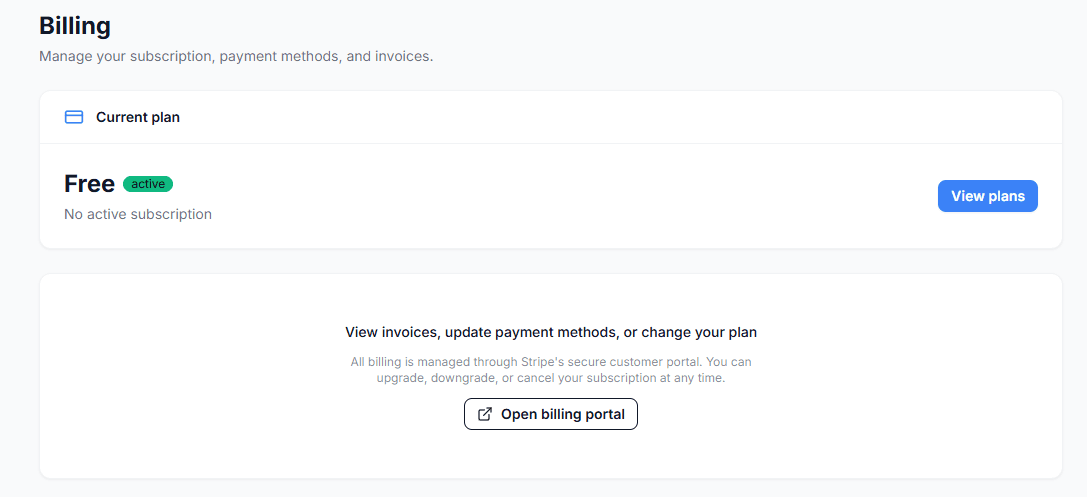
Plan Management
Switching plans is handled via a secure server action that initiates a Stripe checkout session. Once paid, the subscription status is synced to your database via the Stripe Webhook handler.
| 1 | // src/server/subscriptions/upsert-subscription.ts |
| 2 | export async function upsertSubscription(data: SubscriptionData) { |
| 3 | const admin = createAdminClient(); |
| 4 | const { error } = await admin |
| 5 | .from('subscriptions') |
| 6 | .upsert(data); |
| 7 | |
| 8 | if (error) throw error; |
| 9 | } |
The Billing Portal Link
You can generate a direct link for a user to access their hosted Stripe portal using the stripe.billingPortal.sessions.create API in your backend.
What users can do:
- -Update Credit Card / Payment Method
- -View & Download Invoice History
- -Cancel or Reactivate Subscriptions
- -Switch between Monthly and Annual plans
Email Architecture
A flexible, provider-agnostic email layer that handles everything from magic links to event-driven notification workflows.
Multi-Provider Support
LaunchX supports Resend and Mailgun through one email abstraction. Switch providers with environment configuration.
Resend (Default)
Default provider with straightforward setup for transactional delivery.
Mailgun
Alternative provider for teams with existing Mailgun infrastructure.
Sending Transactional Emails
All outgoing emails should use the sendTransactionalEmail() wrapper in src/lib/email.ts. This ensures consistent error handling and provider fallback.
| 1 | import { sendTransactionalEmail } from "@/lib/email"; |
| 2 | |
| 3 | await sendTransactionalEmail({ |
| 4 | to: "user@example.com", |
| 5 | subject: "Welcome to LaunchX!", |
| 6 | html: "<h1>Let's build something great</h1>", |
| 7 | text: "Welcome to Launchkit. Let's build something great." |
| 8 | }); |
React Email Templates
You can send raw HTML, but templates in src/lib/email-templates.ts provide consistent rendering across major email clients.
S3/R2 Storage
A provider-agnostic storage layer for S3-compatible services including AWS S3, Cloudflare R2, and DigitalOcean Spaces.
The Implementation Pattern
The storage layer in src/lib/storage.ts uses presigned URLs so uploads go directly from client to bucket.
| 1 | import { getUploadUrl } from "@/lib/storage"; |
| 2 | |
| 3 | // Request a secure, one-time upload link |
| 4 | const { url, key } = await getUploadUrl("avatars/user_123.png"); |
| 5 | |
| 6 | // Frontend can now PUT to 'url' directly |
| 7 | await fetch(url, { method: "PUT", body: file }); |
Scaling Setup
Step 1: Install SDK
| 1 | npm install @aws-sdk/client-s3 @aws-sdk/s3-request-presigner |
Step 2: Add Keys
Add these to your .env.local. Never commit these secrets.
| 1 | AWS_ACCESS_KEY_ID=... |
| 2 | AWS_SECRET_ACCESS_KEY=... |
| 3 | AWS_REGION=... |
| 4 | S3_BUCKET_NAME=... |
Why Presigned URLs?
By using presigned URLs, your server never actually touches the file data. This makes your application significantly faster, reduces your Vercel bandwidth costs, and eliminates the risk of "Payload Too Large" (413) errors on serverless functions.
Crisp Chat Widget
Engage with your customers in real-time using our pre-integrated Crisp support widget.
Activation Logic
The widget is managed by the src/components/ui/crisp-chat.tsx component. It automatically loads the Crisp script and handles visibility based on your account settings.
| 1 | // src/config/config.ts |
| 2 | export const config = { |
| 3 | crisp: { |
| 4 | id: "YOUR_CRISP_ID_HERE", |
| 5 | onlyShowOnRoutes: ["/pricing", "/support"] // Optional whitelist |
| 6 | } |
| 7 | }; |
How it Works
Automatic Injection
The script is injected into the document head only once when the first client-side render occurs.
Route Whitelisting
Use onlyShowOnRoutes to ensure the chat only appears on contextually relevant pages.
Lazy Loading
The widget respects performance by rendering nothing if the ID is missing from your configuration.
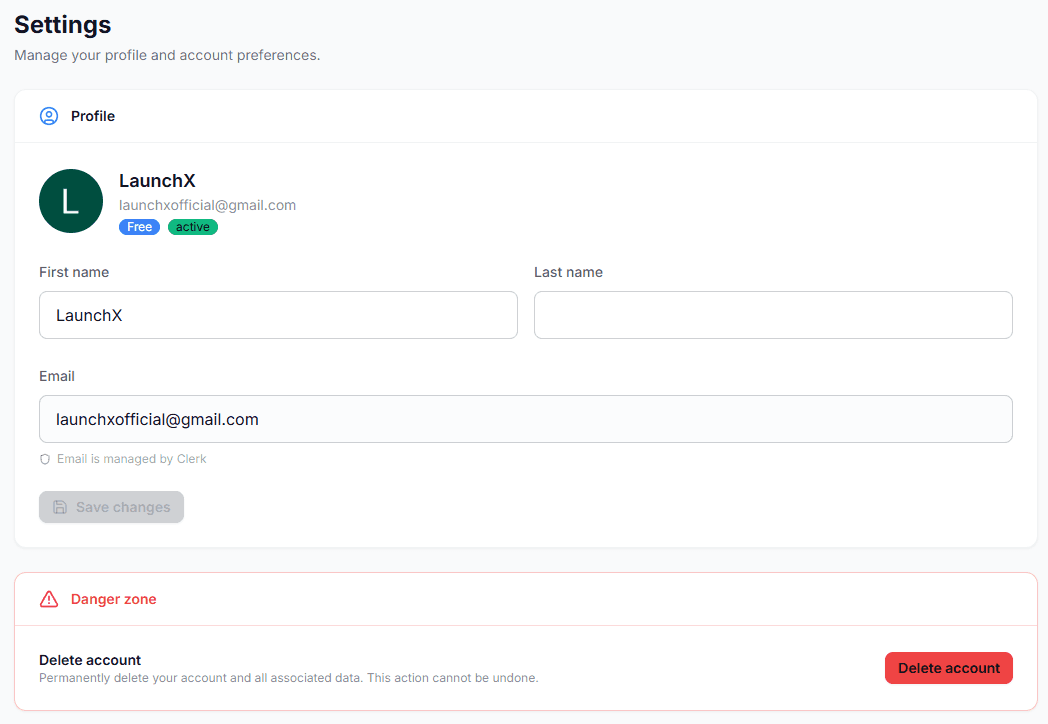
Settings & Profiles
Comprehensive user profile management with high-performance reactive forms and data validation.
Reactive Form Pattern
Settings forms use a headless form pattern with Zod validation. Changes can be persisted through autosave or explicit submit actions.
| 1 | // src/components/dashboard/settings-form.tsx |
| 2 | const updateProfile = async (data: ProfileData) => { |
| 3 | setIsLoading(true); |
| 4 | const res = await fetch("/api/user/update", { |
| 5 | method: "POST", |
| 6 | body: JSON.stringify(data), |
| 7 | }); |
| 8 | setIsLoading(false); |
| 9 | if (res.ok) toast.success("Profile saved!"); |
| 10 | }; |
Danger Zone
Critical actions like account deletion are gated by confirmation dialogs. See src/components/dashboard/delete-account-modal.tsx.
Security Note
When a user deletes their account, we trigger a cleanup job that safely removes their data from Supabase and cancels their active Stripe subscription automatically via a background webhook.
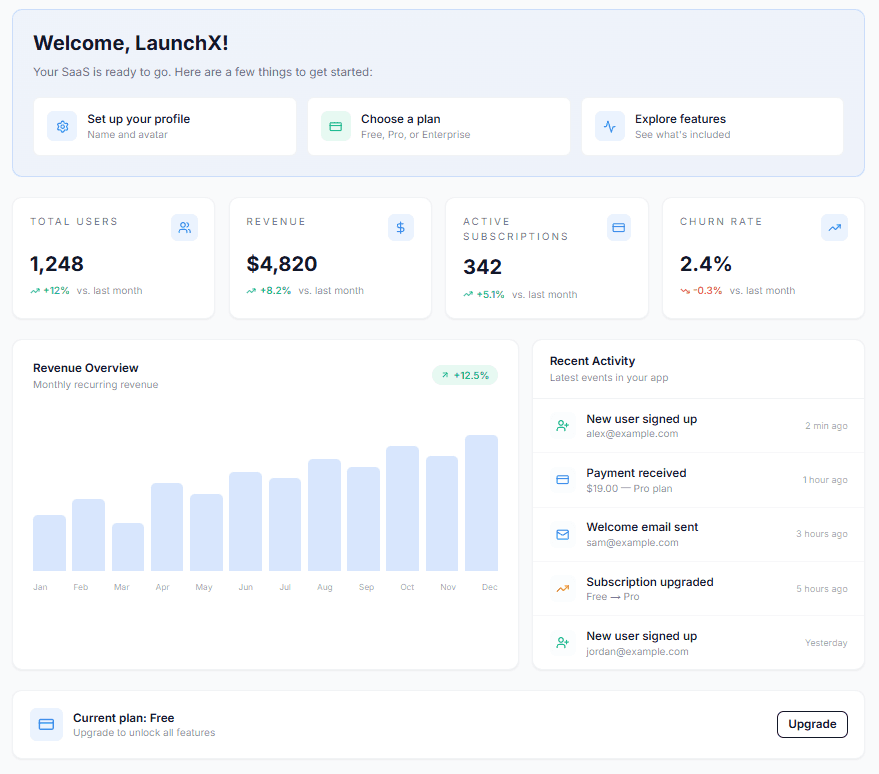
Success Metrics
LaunchX provides built-in charting components to track your SaaS growth, MRR, and user activity in real-time.
The StatCard Component
Located in src/components/dashboard/stats-card.tsx, this component handles trend indicators and formatting automatically.
| 1 | <StatCard |
| 2 | title="Monthly Recurring Revenue" |
| 3 | value="$12,450" |
| 4 | trend="+12%" |
| 5 | description="vs last month" |
| 6 | /> |
Dynamic Charting
Recharts is used for growth visualization. Data is loaded server-side and passed into client chart components.
Features
- • Fully Responsive / Auto-scaling
- • Custom Tooltips & Grid Styling
- • Animated Path Transitions
- • Tailored for HSL Theme Variables
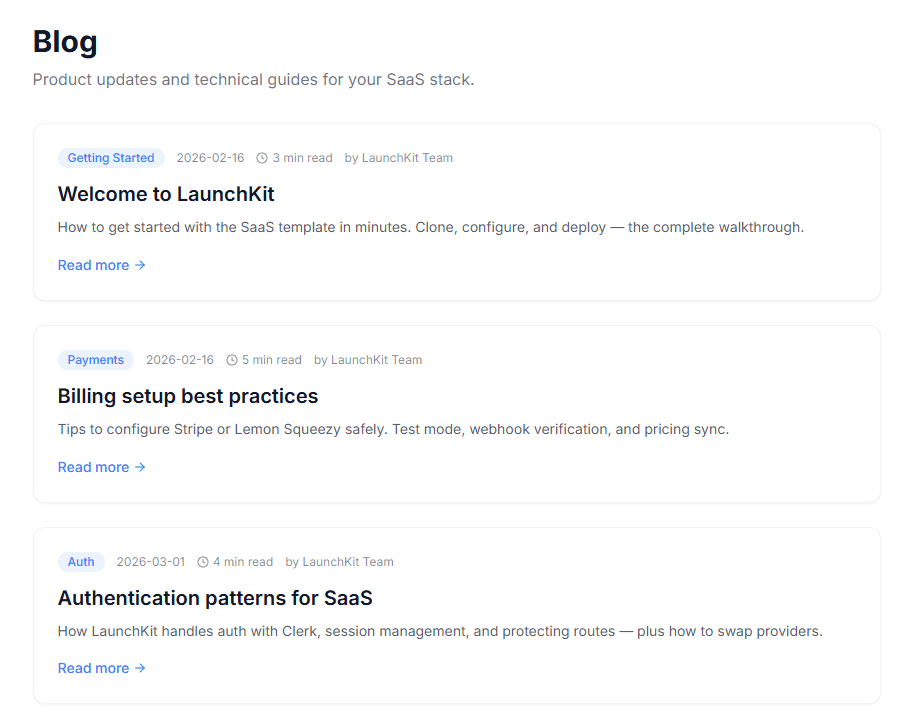
MDX Blog System
A built-in, SEO-optimized blogging engine that turns MDX files into high-performance product pages.
Writing Posts
Posts are written in MDX (Markdown + React Components). Simply create a new `post-slug.mdx` file in your content directory.
| 1 | --- |
| 2 | title: "How to ship a SaaS in 2026" |
| 3 | description: "A complete guide to the modern stack." |
| 4 | date: "2026-04-09" |
| 5 | author: "LaunchX Team" |
| 6 | image: "/blog/hero.png" |
| 7 | --- |
| 8 | |
| 9 | # Hello LaunchX! |
| 10 | |
| 11 | You can use standard markdown and **React Components** right inside your text. |
SEO Automation
The blog automatically generates JSON-LD schema tags, OpenGraph images, and Meta tags for every post using the src/lib/seo.tsx helper.
- -Automatic Canonical URLs generation.
- -Structured data for Article and Breadcrumbs.
- -Dynamic Sitemap.xml integration.
Testimonials
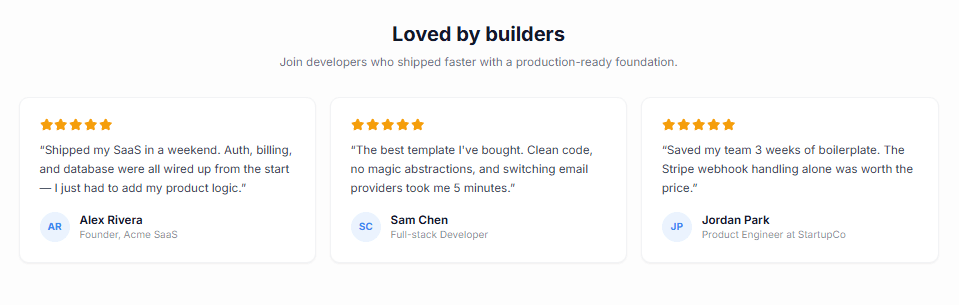
Use testimonials as demo content in your SaaS template. These are placeholders for your users to replace with their own customer quotes before shipping.
Where It Belongs
On landing pages, place testimonials after feature explanation and before pricing to improve trust before pricing comparison.
Sample Placeholder Data
Keep testimonial content editable and clearly marked as sample content in the template.
| 1 | export const testimonials = [ |
| 2 | { |
| 3 | quote: "This template cut our build time from weeks to days.", |
| 4 | name: "Alex Rivera", |
| 5 | role: "Founder, Example SaaS", |
| 6 | avatar: "/avatars/alex.png", |
| 7 | }, |
| 8 | { |
| 9 | quote: "Great defaults and easy to customize for our brand.", |
| 10 | name: "Sam Patel", |
| 11 | role: "Product Lead, DemoCo", |
| 12 | avatar: "/avatars/sam.png", |
| 13 | }, |
| 14 | ]; |
Important
Replace all demo testimonials with real customer feedback before production launch.
Standardized API
Predictable API responses are the foundation of a stable frontend. LaunchX enforces a uniform JSON structure for every endpoint.
The Pattern
Instead of manual Response.json() calls, use the helpers in src/lib/api-response.ts. This ensures every response contains a success boolean and a consistent wrapper.
Success Response
| 1 | // On the Server |
| 2 | return jsonSuccess({ id: "user_123", email: "test@example.com" }); |
| 3 | |
| 4 | // Output JSON |
| 5 | { |
| 6 | "success": true, |
| 7 | "data": { "id": "user_123", "email": "test@example.com" } |
| 8 | } |
Error Response
| 1 | // On the Server |
| 2 | return jsonError("Unauthorized access", 401, "AUTH_REQUIRED"); |
| 3 | |
| 4 | // Output JSON |
| 5 | { |
| 6 | "success": false, |
| 7 | "error": { |
| 8 | "message": "Unauthorized access", |
| 9 | "code": "AUTH_REQUIRED" |
| 10 | } |
| 11 | } |
Frontend Consumption
By standardizing the error object to always include a message, you can create a single reusable toast handler for all your API calls.
| 1 | const res = await fetch("/api/endpoint"); |
| 2 | const json = await res.json(); |
| 3 | |
| 4 | if (!json.success) { |
| 5 | return toast.error(json.error.message); |
| 6 | } |
| 7 | |
| 8 | // Proceed with json.data... |
Middleware & Proxy
LaunchX uses a unified Proxy layer to consolidate security, authentication, and traffic control into a single high-performance middleware.
Edge Security Logic
Everything starts in src/proxy.ts. This file wraps the Clerk middleware and adds a custom security layer that executes before the request even reaches your Next.js pages.
1. Clerk Auth Integration
Ensures that /dashboard and /admin are gated, while public routes remain fast and accessible.
2. IP-Based Throttling
Matches the client IP and applies a dual-limit strategy:
- • Sensitive (/sign-in, /sign-up, /api/auth): 5 req / 15 mins
- • Public (All others): 120 req / 1 min
Custom Configuration
You can customize which routes are considered "sensitive" by updating the sensitivePaths Set in src/proxy.ts.
| 1 | const sensitivePaths = new Set([ |
| 2 | "/sign-in", |
| 3 | "/sign-up", |
| 4 | "/api/auth", |
| 5 | "/api/newsletter/subscribe" // Add your own here |
| 6 | ]); |
Advanced Headers
The proxy automatically injects X-RateLimit-Remaining and X-RateLimit-Reset headers into every response. You can use these in your frontend to show proactive warnings to users who are hitting their limits.
Rate Limiting
LaunchX includes a built-in rate limiting layer to prevent brute-force attacks and ensure fair API usage across your platform.
The Implementation
The rate limiter logic resides in src/lib/rate-limit.ts. It uses a sliding window algorithm to track requests per IP address (or any custom key).
| 1 | import { rateLimit } from "@/lib/rate-limit"; |
| 2 | |
| 3 | // Allow 5 requests per 10 minutes for this key |
| 4 | const { allowed, remaining } = rateLimit("auth_attempt", { |
| 5 | windowMs: 10 * 60 * 1000, |
| 6 | max: 5 |
| 7 | }); |
| 8 | |
| 9 | if (!allowed) { |
| 10 | return jsonError("Too many attempts. Try again later.", 429); |
| 11 | } |
Scaling to Redis
By default, the rate limiter uses an in-memory store (Map). While this works perfectly for single-node deployments, you can easily swap the store for Redis/Upstash in src/lib/rate-limit.ts for multi-region serverless scaling.
Security Recommended
We recommend applying rate limits to all sensitive routes, including:
- • /api/auth/* (Login attempts)
- • /api/email/* (Spam prevention)
- • /api/admin/* (Extra protection)
SEO & Analytics
LaunchX automates search engine optimization with standardized metadata generators and JSON-LD structured data scripts.
The Metadata Pattern
Instead of manual metadata objects, use the getSEOTags() helper in src/lib/seo.tsx. It pulls defaults from your config.ts and ensures OpenGraph, Twitter, and Canonical tags are identical across pages.
| 1 | // app/pricing/page.tsx |
| 2 | import { getSEOTags } from "@/lib/seo"; |
| 3 | |
| 4 | export const metadata = getSEOTags({ |
| 5 | title: "Pricing Plans", |
| 6 | description: "Flexible annual and monthly billing options." |
| 7 | }); |
JSON-LD Structured Data
To rank better in Google rich results, use the renderSchemaTags() component. This generates the invisible script tags that help search engines understand your product, author, or software application.
| 1 | // app/blog/[slug]/page.tsx |
| 2 | import { renderSchemaTags } from "@/lib/seo"; |
| 3 | |
| 4 | export default function BlogPost() { |
| 5 | return ( |
| 6 | <> |
| 7 | {renderSchemaTags({ |
| 8 | type: "BlogPosting", |
| 9 | name: post.title, |
| 10 | datePublished: post.date, |
| 11 | })} |
| 12 | <article>...</article> |
| 13 | </> |
| 14 | ); |
| 15 | } |
Canonical Link Logic
The helper automatically handles local development vs production URLs. It uses your config.domainName to generate absolute canonical links, preventing duplicate content issues when you have multiple staging environments.
Internal Style Guide
LaunchX ships with a curated library of 25+ atomic UI components, designed for consistency and speed.
Previewing Components
You can view every component in action at the live showcase route: /style. This page demonstrates all states (hover, loading, disabled) and various theme variations.
Core Component Categories
Feedback & Status
- Alert — Standard informational/error banners.
- Badge — Compact status labels (Pro, Trial, Active).
- Progress — Minimal horizontal progress bars.
- Skeleton — Ghost loading states for dashboard metrics.
Navigation & Hierarchy
- Breadcrumb — Page path indicators.
- Steps — Multi-stage onboarding flows.
- Timeline — Sequential event logging.
- Tabs — Toggled category navigation.
Usage Example: Stat
The Stat component is used heavily in the dashboard and admin panel to highlight KPIs.
| 1 | import Stat from "@/components/ui/stat"; |
| 2 | |
| 3 | <Stat |
| 4 | label="Active users" |
| 5 | value="1.4k" |
| 6 | description="+12% this week" |
| 7 | /> |
Philosophy
All components are built using Vanilla Tailwind CSS and DaisyUI utility classes. We avoid complex CSS-in-JS libraries to ensure zero runtime overhead and maximum portability.
DaisyUI Themes
LaunchX includes six predefined themes. Set the active theme from the central config.
lightHow it works
The theme system is built with DaisyUI and Tailwind CSS variables, so component tokens update consistently when the active theme changes.
Apply a theme
Open src/config/config.ts and update the theme property:
| 1 | export const config = { |
| 2 | // ... other settings |
| 3 | theme: "dark", // Switch to "dracula", "forest", etc. |
| 4 | darkTheme: "dark" |
| 5 | }; |
Adding Custom Themes
You can add any DaisyUI theme (or your own custom one) by adding it to the tailwind.config.ts daisyui plugin configuration.
| 1 | daisyui: { |
| 2 | themes: ["dark", "light", "dracula", "forest", "business", "synthwave"], |
| 3 | }, |
Modals & Dialogs
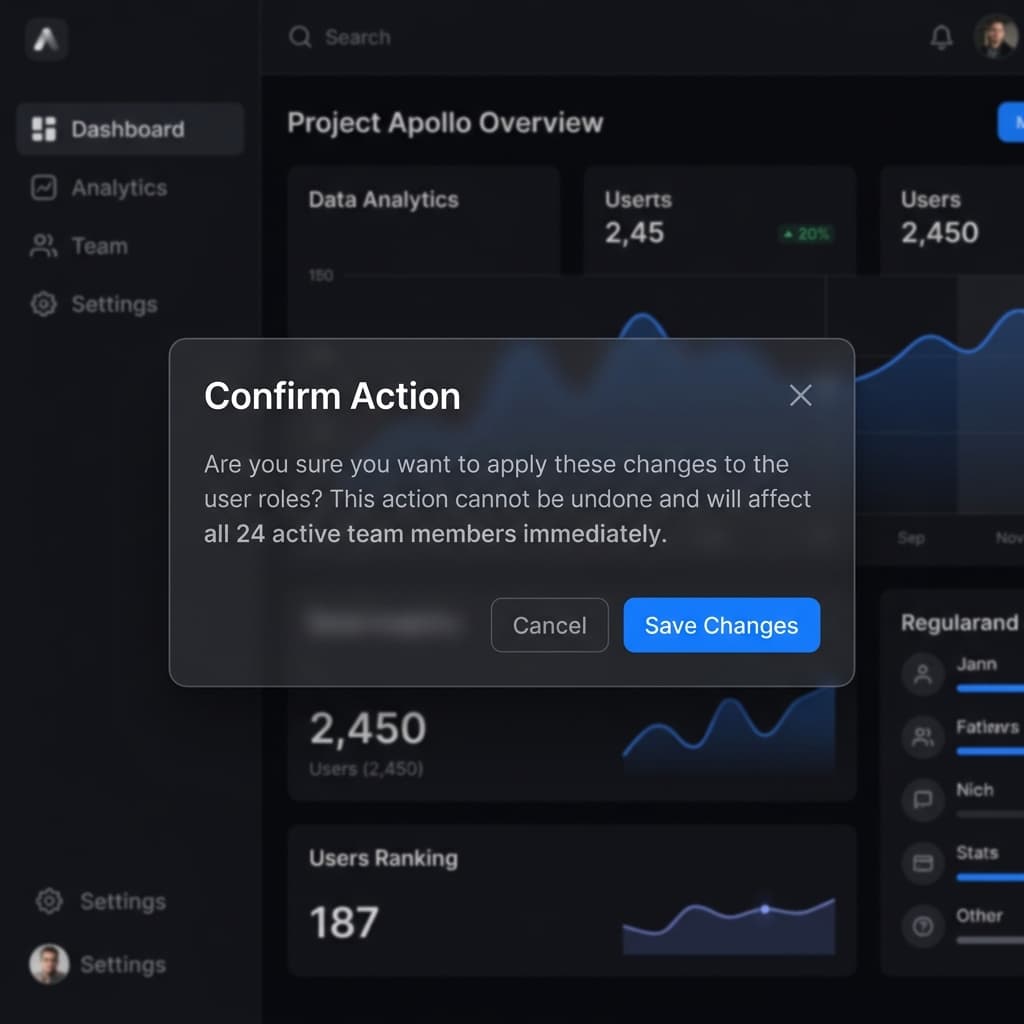
The template includes a standardized, accessible modal component built on top of DaisyUI's portal system.
Core Component
The primary modal component is located at src/components/ui/modal.tsx. It handles background blurring, focus trapping, and animations automatically.
| 1 | import Modal from "@/components/ui/modal"; |
| 2 | |
| 3 | <Modal |
| 4 | title="Discard Changes?" |
| 5 | description="All unsaved progress will be permanently lost." |
| 6 | open={isOpen} |
| 7 | onClose={() => setIsOpen(false)} |
| 8 | > |
| 9 | <div className="py-4"> |
| 10 | <p>Are you 100% sure you want to proceed?</p> |
| 11 | </div> |
| 12 | </Modal> |
Component Props
| Prop | Type | Description |
|---|---|---|
| title | string | The main heading of the modal. |
| description | string | Optional sub-text for additional context. |
| open | boolean | Controls the visibility state. |
| onClose | () => void | Callback function triggered when clicking 'Close'. |
Toast Notifications
A built-in notification system designed for real-time feedback without interrupting the user flow.
Technical Implementation
Unlike heavy external libraries, the template uses a specialized Toast component located in src/components/ui/toast.tsx. It integrates directly with DaisyUI's alert system for consistent styling.
| 1 | import Toast from "@/components/ui/toast"; |
| 2 | |
| 3 | <Toast |
| 4 | message="Profile updated successfully!" |
| 5 | tone="success" |
| 6 | onDismiss={() => {}} |
| 7 | /> |
Tone Options
The notification system supports four semantic tones that map to DaisyUI states:
successDaisyUI AlerterrorDaisyUI AlertinfoDaisyUI AlertwarningDaisyUI AlertMigrate from Clerk to Better Auth
Replace Clerk with Better Auth, an open-source, self-hosted authentication library — no vendor lock-in, no per-user pricing.
What Changes
| Layer | Action |
|---|---|
| Auth abstraction (src/lib/auth.ts) | Replace 5 function bodies |
| Auth UI (4 components + 2 pages) | Replace with custom forms |
| Middleware (src/proxy.ts) | Replace Clerk middleware with Better Auth session check |
| Root layout (src/app/layout.tsx) | Remove ClerkProvider |
| Webhook (src/app/api/auth/webhook/) | Delete entirely |
| Environment variables | Swap Clerk vars for Better Auth vars |
| Database | Run one migration |
Step-by-Step Migration
Install Dependencies
Remove Clerk packages and install Better Auth.
| 1 | npm uninstall @clerk/nextjs svix |
| 2 | npm install better-auth |
Set Up Better Auth Server
Create the server instance, the Next.js API catch-all route, and the client helper.
| 1 | import { betterAuth } from "better-auth"; |
| 2 | |
| 3 | export const auth = betterAuth({ |
| 4 | database: { |
| 5 | type: "postgres", |
| 6 | url: process.env.DATABASE_URL! |
| 7 | }, |
| 8 | emailAndPassword: { |
| 9 | enabled: true |
| 10 | }, |
| 11 | session: { |
| 12 | cookieCache: { |
| 13 | enabled: true, |
| 14 | maxAge: 5 * 60 // 5 minutes |
| 15 | } |
| 16 | } |
| 17 | }); |
| 1 | import { toNextJsHandler } from "better-auth/next-js"; |
| 2 | import { auth } from "@/lib/better-auth-server"; // new file |
| 3 | |
| 4 | export const { GET, POST } = toNextJsHandler(auth); |
| 1 | import { createAuthClient } from "better-auth/react"; |
| 2 | |
| 3 | export const authClient = createAuthClient({ |
| 4 | baseURL: process.env.NEXT_PUBLIC_APP_URL |
| 5 | }); |
Database Migration
Better Auth manages its own tables (user, session, account, verification). Run the CLI migration, then rename the Clerk-specific column.
| 1 | npx better-auth migrate |
| 1 | -- Rename the column |
| 2 | ALTER TABLE users RENAME COLUMN clerk_id TO auth_provider_id; |
| 3 | |
| 4 | -- Update the unique index |
| 5 | ALTER INDEX users_clerk_id_key RENAME TO users_auth_provider_id_key; |
Also update these files:
- →src/server/subscriptions/queries.ts — change .eq("clerk_id", ...) to .eq("auth_provider_id", ...)
- →src/server/subscriptions/service.ts — rename the clerkId field to authUserId
- →src/server/stripe/webhooks.ts — change all references to clerkId metadata to authUserId
- →src/app/api/stripe/checkout/route.ts — update client_reference_id metadata key if applicable
Replace src/lib/auth.ts
Replace the entire file contents. All 9 server-side files that import from the auth module will work without any changes.
| 1 | import { auth } from "@/lib/better-auth-server"; |
| 2 | import { headers } from "next/headers"; |
| 3 | |
| 4 | export const AUTH_PROVIDER_NAME = "Better Auth"; |
| 5 | |
| 6 | export type AuthUser = { |
| 7 | id: string; |
| 8 | email: string | null; |
| 9 | firstName: string | null; |
| 10 | lastName: string | null; |
| 11 | imageUrl: string | null; |
| 12 | }; |
| 13 | |
| 14 | export async function getAuthUserId(): Promise<string | null> { |
| 15 | const session = await auth.api.getSession({ |
| 16 | headers: await headers() |
| 17 | }); |
| 18 | return session?.user?.id ?? null; |
| 19 | } |
| 20 | |
| 21 | export async function requireAuth(): Promise<string> { |
| 22 | const userId = await getAuthUserId(); |
| 23 | if (!userId) throw new Error("Unauthorized"); |
| 24 | return userId; |
| 25 | } |
| 26 | |
| 27 | export async function getCurrentUser(): Promise<AuthUser | null> { |
| 28 | const session = await auth.api.getSession({ |
| 29 | headers: await headers() |
| 30 | }); |
| 31 | if (!session?.user) return null; |
| 32 | return { |
| 33 | id: session.user.id, |
| 34 | email: session.user.email ?? null, |
| 35 | firstName: session.user.name?.split(" ")[0] ?? null, |
| 36 | lastName: session.user.name?.split(" ").slice(1).join(" ") ?? null, |
| 37 | imageUrl: session.user.image ?? null |
| 38 | }; |
| 39 | } |
| 40 | |
| 41 | export async function updateUserProfile( |
| 42 | userId: string, |
| 43 | data: { firstName: string; lastName: string } |
| 44 | ): Promise<void> { |
| 45 | const name = [data.firstName, data.lastName].filter(Boolean).join(" "); |
| 46 | await auth.api.updateUser({ |
| 47 | body: { name }, |
| 48 | headers: await headers() |
| 49 | }); |
| 50 | } |
| 51 | |
| 52 | export async function deleteUserAccount(userId: string): Promise<void> { |
| 53 | await auth.api.deleteUser({ |
| 54 | headers: await headers() |
| 55 | }); |
| 56 | } |
Replace Environment Variables
Remove Clerk environment variables and add Better Auth secrets.
| 1 | NEXT_PUBLIC_CLERK_PUBLISHABLE_KEY |
| 2 | CLERK_SECRET_KEY |
| 3 | CLERK_WEBHOOK_SECRET |
| 1 | BETTER_AUTH_SECRET=your-random-secret-at-least-32-chars |
| 2 | DATABASE_URL=postgresql://postgres:[password]@db.[ref].supabase.co:5432/postgres |
| 1 | // In serverSchema, replace: |
| 2 | // Remove these: |
| 3 | CLERK_SECRET_KEY: z.string().min(1), |
| 4 | CLERK_WEBHOOK_SECRET: z.string().min(1).optional(), |
| 5 | |
| 6 | // Add these: |
| 7 | BETTER_AUTH_SECRET: z.string().min(32), |
| 8 | DATABASE_URL: z.string().url(), |
| 9 | |
| 10 | // In clientSchema, remove: |
| 11 | NEXT_PUBLIC_CLERK_PUBLISHABLE_KEY: z.string().min(1), |
Replace Root Layout
Remove the ClerkProvider wrapper from the root layout.
| 1 | // Remove these imports: |
| 2 | import { ClerkProvider } from "@clerk/nextjs"; |
| 3 | |
| 4 | // Remove these variables: |
| 5 | const clerkKey = process.env.NEXT_PUBLIC_CLERK_PUBLISHABLE_KEY ?? ""; |
| 6 | const enableClerk = ...; |
| 7 | |
| 8 | // Replace the conditional return at the bottom. |
| 9 | // Before: |
| 10 | if (!enableClerk) { |
| 11 | return content; |
| 12 | } |
| 13 | return <ClerkProvider>{content}</ClerkProvider>; |
| 14 | |
| 15 | // After: |
| 16 | return content; |
Replace Auth UI Components
Replace the three auth-related UI components with Better Auth equivalents.
| 1 | "use client"; |
| 2 | |
| 3 | import Link from "next/link"; |
| 4 | import { useRouter } from "next/navigation"; |
| 5 | import { authClient } from "@/lib/better-auth-client"; |
| 6 | |
| 7 | export default function HeaderAuthButtons() { |
| 8 | const { data: session } = authClient.useSession(); |
| 9 | const router = useRouter(); |
| 10 | |
| 11 | if (session?.user) { |
| 12 | return ( |
| 13 | <div className="flex items-center gap-3"> |
| 14 | <Link href="/dashboard" className="btn btn-ghost btn-sm"> |
| 15 | Dashboard |
| 16 | </Link> |
| 17 | <button |
| 18 | type="button" |
| 19 | className="btn btn-ghost btn-sm" |
| 20 | onClick={async () => { |
| 21 | await authClient.signOut(); |
| 22 | router.push("/"); |
| 23 | }} |
| 24 | > |
| 25 | Sign out |
| 26 | </button> |
| 27 | </div> |
| 28 | ); |
| 29 | } |
| 30 | |
| 31 | return ( |
| 32 | <div className="flex items-center gap-3"> |
| 33 | <Link href="/sign-in" className="btn btn-ghost btn-sm"> |
| 34 | Sign in |
| 35 | </Link> |
| 36 | <Link href="/sign-up" className="btn btn-primary btn-sm"> |
| 37 | Get started |
| 38 | </Link> |
| 39 | </div> |
| 40 | ); |
| 41 | } |
| 1 | import Link from "next/link"; |
| 2 | |
| 3 | export default function LaunchKitSignInButton() { |
| 4 | return ( |
| 5 | <Link |
| 6 | href="/sign-in" |
| 7 | className="rounded-md border border-border/60 px-4 py-2 text-sm font-medium transition-colors hover:bg-base-200" |
| 8 | > |
| 9 | Sign in |
| 10 | </Link> |
| 11 | ); |
| 12 | } |
| 1 | "use client"; |
| 2 | |
| 3 | import { useRouter } from "next/navigation"; |
| 4 | import { authClient } from "@/lib/better-auth-client"; |
| 5 | |
| 6 | export default function UserMenu() { |
| 7 | const { data: session } = authClient.useSession(); |
| 8 | const router = useRouter(); |
| 9 | |
| 10 | return ( |
| 11 | <div className="dropdown dropdown-end"> |
| 12 | <div tabIndex={0} role="button" className="btn btn-ghost btn-circle"> |
| 13 | {session?.user?.image ? ( |
| 14 | <img |
| 15 | src={session.user.image} |
| 16 | alt="" |
| 17 | className="h-8 w-8 rounded-full object-cover" |
| 18 | /> |
| 19 | ) : ( |
| 20 | <div className="flex h-8 w-8 items-center justify-center rounded-full bg-primary/10 text-xs font-bold text-primary"> |
| 21 | {session?.user?.name?.[0] ?? "U"} |
| 22 | </div> |
| 23 | )} |
| 24 | </div> |
| 25 | <ul tabIndex={0} className="menu dropdown-content z-50 mt-2 w-40 rounded-lg bg-base-100 p-2 shadow-lg"> |
| 26 | <li> |
| 27 | <button |
| 28 | onClick={async () => { |
| 29 | await authClient.signOut(); |
| 30 | router.push("/"); |
| 31 | }} |
| 32 | > |
| 33 | Sign out |
| 34 | </button> |
| 35 | </li> |
| 36 | </ul> |
| 37 | </div> |
| 38 | ); |
| 39 | } |
Replace Sign-In / Sign-Up Pages
Replace the Clerk-powered auth pages with custom email + password forms.
| 1 | "use client"; |
| 2 | |
| 3 | import { useState } from "react"; |
| 4 | import { useRouter } from "next/navigation"; |
| 5 | import Link from "next/link"; |
| 6 | import PublicHeader from "@/components/layout/public-header"; |
| 7 | import { authClient } from "@/lib/better-auth-client"; |
| 8 | |
| 9 | export default function SignInPage() { |
| 10 | const [email, setEmail] = useState(""); |
| 11 | const [password, setPassword] = useState(""); |
| 12 | const [error, setError] = useState(""); |
| 13 | const [loading, setLoading] = useState(false); |
| 14 | const router = useRouter(); |
| 15 | |
| 16 | const handleSubmit = async (e: React.FormEvent) => { |
| 17 | e.preventDefault(); |
| 18 | setError(""); |
| 19 | setLoading(true); |
| 20 | |
| 21 | const result = await authClient.signIn.email({ |
| 22 | email, |
| 23 | password |
| 24 | }); |
| 25 | |
| 26 | if (result.error) { |
| 27 | setError(result.error.message ?? "Invalid credentials"); |
| 28 | setLoading(false); |
| 29 | } else { |
| 30 | router.push("/dashboard"); |
| 31 | } |
| 32 | }; |
| 33 | |
| 34 | return ( |
| 35 | <> |
| 36 | <PublicHeader /> |
| 37 | <main className="flex min-h-[calc(100vh-65px)] items-center justify-center px-6 py-12"> |
| 38 | <div className="w-full max-w-sm space-y-6"> |
| 39 | <div className="text-center"> |
| 40 | <h1 className="text-2xl font-bold">Sign in</h1> |
| 41 | <p className="mt-1 text-sm text-base-content/60"> |
| 42 | Welcome back. Enter your credentials to continue. |
| 43 | </p> |
| 44 | </div> |
| 45 | |
| 46 | <form onSubmit={handleSubmit} className="space-y-4"> |
| 47 | {error && ( |
| 48 | <div className="rounded-lg bg-error/10 px-4 py-3 text-sm text-error"> |
| 49 | {error} |
| 50 | </div> |
| 51 | )} |
| 52 | |
| 53 | <div className="space-y-2"> |
| 54 | <label htmlFor="email" className="text-sm font-medium">Email</label> |
| 55 | <input |
| 56 | id="email" type="email" |
| 57 | className="input input-bordered w-full" |
| 58 | value={email} onChange={(e) => setEmail(e.target.value)} required |
| 59 | /> |
| 60 | </div> |
| 61 | |
| 62 | <div className="space-y-2"> |
| 63 | <label htmlFor="password" className="text-sm font-medium">Password</label> |
| 64 | <input |
| 65 | id="password" type="password" |
| 66 | className="input input-bordered w-full" |
| 67 | value={password} onChange={(e) => setPassword(e.target.value)} required |
| 68 | /> |
| 69 | </div> |
| 70 | |
| 71 | <button type="submit" className="btn btn-primary w-full" disabled={loading}> |
| 72 | {loading ? "Signing in..." : "Sign in"} |
| 73 | </button> |
| 74 | </form> |
| 75 | |
| 76 | <p className="text-center text-sm text-base-content/60"> |
| 77 | Don't have an account?{" "} |
| 78 | <Link href="/sign-up" className="font-medium text-primary hover:underline"> |
| 79 | Sign up |
| 80 | </Link> |
| 81 | </p> |
| 82 | </div> |
| 83 | </main> |
| 84 | </> |
| 85 | ); |
| 86 | } |
| 1 | "use client"; |
| 2 | |
| 3 | import { useState } from "react"; |
| 4 | import { useRouter } from "next/navigation"; |
| 5 | import Link from "next/link"; |
| 6 | import PublicHeader from "@/components/layout/public-header"; |
| 7 | import { authClient } from "@/lib/better-auth-client"; |
| 8 | |
| 9 | export default function SignUpPage() { |
| 10 | const [name, setName] = useState(""); |
| 11 | const [email, setEmail] = useState(""); |
| 12 | const [password, setPassword] = useState(""); |
| 13 | const [error, setError] = useState(""); |
| 14 | const [loading, setLoading] = useState(false); |
| 15 | const router = useRouter(); |
| 16 | |
| 17 | const handleSubmit = async (e: React.FormEvent) => { |
| 18 | e.preventDefault(); |
| 19 | setError(""); |
| 20 | setLoading(true); |
| 21 | |
| 22 | const result = await authClient.signUp.email({ |
| 23 | name, |
| 24 | email, |
| 25 | password |
| 26 | }); |
| 27 | |
| 28 | if (result.error) { |
| 29 | setError(result.error.message ?? "Could not create account"); |
| 30 | setLoading(false); |
| 31 | } else { |
| 32 | router.push("/dashboard"); |
| 33 | } |
| 34 | }; |
| 35 | |
| 36 | return ( |
| 37 | <> |
| 38 | <PublicHeader /> |
| 39 | <main className="flex min-h-[calc(100vh-65px)] items-center justify-center px-6 py-12"> |
| 40 | <div className="w-full max-w-sm space-y-6"> |
| 41 | <div className="text-center"> |
| 42 | <h1 className="text-2xl font-bold">Create an account</h1> |
| 43 | <p className="mt-1 text-sm text-base-content/60"> |
| 44 | Get started with your free account. |
| 45 | </p> |
| 46 | </div> |
| 47 | |
| 48 | <form onSubmit={handleSubmit} className="space-y-4"> |
| 49 | {error && ( |
| 50 | <div className="rounded-lg bg-error/10 px-4 py-3 text-sm text-error"> |
| 51 | {error} |
| 52 | </div> |
| 53 | )} |
| 54 | |
| 55 | <div className="space-y-2"> |
| 56 | <label htmlFor="name" className="text-sm font-medium">Full name</label> |
| 57 | <input |
| 58 | id="name" type="text" |
| 59 | className="input input-bordered w-full" |
| 60 | value={name} onChange={(e) => setName(e.target.value)} required |
| 61 | /> |
| 62 | </div> |
| 63 | |
| 64 | <div className="space-y-2"> |
| 65 | <label htmlFor="email" className="text-sm font-medium">Email</label> |
| 66 | <input |
| 67 | id="email" type="email" |
| 68 | className="input input-bordered w-full" |
| 69 | value={email} onChange={(e) => setEmail(e.target.value)} required |
| 70 | /> |
| 71 | </div> |
| 72 | |
| 73 | <div className="space-y-2"> |
| 74 | <label htmlFor="password" className="text-sm font-medium">Password</label> |
| 75 | <input |
| 76 | id="password" type="password" |
| 77 | className="input input-bordered w-full" |
| 78 | value={password} onChange={(e) => setPassword(e.target.value)} |
| 79 | required minLength={8} |
| 80 | /> |
| 81 | </div> |
| 82 | |
| 83 | <button type="submit" className="btn btn-primary w-full" disabled={loading}> |
| 84 | {loading ? "Creating account..." : "Create account"} |
| 85 | </button> |
| 86 | </form> |
| 87 | |
| 88 | <p className="text-center text-sm text-base-content/60"> |
| 89 | Already have an account?{" "} |
| 90 | <Link href="/sign-in" className="font-medium text-primary hover:underline"> |
| 91 | Sign in |
| 92 | </Link> |
| 93 | </p> |
| 94 | </div> |
| 95 | </main> |
| 96 | </> |
| 97 | ); |
| 98 | } |
Replace Middleware
Replace the Clerk middleware with a custom rate limiter. Better Auth handles session validation at the API layer instead of the edge.
| 1 | import { NextResponse } from "next/server"; |
| 2 | import type { NextRequest } from "next/server"; |
| 3 | |
| 4 | const rateLimitStore = new Map<string, { count: number; resetAt: number }>(); |
| 5 | |
| 6 | function rateLimit(key: string, windowMs: number, max: number) { |
| 7 | const now = Date.now(); |
| 8 | const entry = rateLimitStore.get(key); |
| 9 | if (!entry || now > entry.resetAt) { |
| 10 | rateLimitStore.set(key, { count: 1, resetAt: now + windowMs }); |
| 11 | return { allowed: true, remaining: max - 1 }; |
| 12 | } |
| 13 | entry.count++; |
| 14 | if (entry.count > max) { |
| 15 | return { allowed: false, remaining: 0, resetAt: entry.resetAt }; |
| 16 | } |
| 17 | return { allowed: true, remaining: max - entry.count }; |
| 18 | } |
| 19 | |
| 20 | function getClientIp(request: NextRequest) { |
| 21 | return ( |
| 22 | request.headers.get("x-forwarded-for")?.split(",")[0]?.trim() ?? |
| 23 | request.headers.get("x-real-ip") ?? |
| 24 | "unknown" |
| 25 | ); |
| 26 | } |
| 27 | |
| 28 | const SENSITIVE_PATHS = ["/sign-in", "/sign-up", "/api/auth"]; |
| 29 | |
| 30 | export default function middleware(request: NextRequest) { |
| 31 | const ip = getClientIp(request); |
| 32 | const path = request.nextUrl.pathname; |
| 33 | const isSensitive = SENSITIVE_PATHS.some((p) => path.startsWith(p)); |
| 34 | |
| 35 | const { allowed, remaining, resetAt } = isSensitive |
| 36 | ? rateLimit(`sensitive:${ip}`, 15 * 60 * 1000, 5) |
| 37 | : rateLimit(`public:${ip}`, 60 * 1000, 120); |
| 38 | |
| 39 | if (!allowed) { |
| 40 | return new NextResponse("Too Many Requests", { |
| 41 | status: 429, |
| 42 | headers: { |
| 43 | "Retry-After": String(Math.ceil(((resetAt ?? 0) - Date.now()) / 1000)), |
| 44 | "X-RateLimit-Remaining": "0" |
| 45 | } |
| 46 | }); |
| 47 | } |
| 48 | |
| 49 | const response = NextResponse.next(); |
| 50 | response.headers.set("X-RateLimit-Remaining", String(remaining)); |
| 51 | return response; |
| 52 | } |
| 53 | |
| 54 | export const config = { |
| 55 | matcher: [ |
| 56 | "/((?!_next|[^?]*\\.(?:html?|css|js(?!on)|jpe?g|webp|png|gif|svg|ttf|woff2?|ico|csv|docx?|xlsx?|zip|webmanifest)).*)", |
| 57 | "/(api|trpc)(.*)" |
| 58 | ] |
| 59 | }; |
Delete Clerk Webhook & Add User Sync Hook
Better Auth writes directly to the database — no webhook sync needed. Instead, add a signup hook to sync new users to your LaunchKit users table.
| 1 | rm src/app/api/auth/webhook/route.ts |
| 1 | import { betterAuth } from "better-auth"; |
| 2 | import { createClient } from "@supabase/supabase-js"; |
| 3 | |
| 4 | const supabase = createClient( |
| 5 | process.env.NEXT_PUBLIC_SUPABASE_URL!, |
| 6 | process.env.SUPABASE_SERVICE_ROLE_KEY! |
| 7 | ); |
| 8 | |
| 9 | export const auth = betterAuth({ |
| 10 | database: { |
| 11 | type: "postgres", |
| 12 | url: process.env.DATABASE_URL! |
| 13 | }, |
| 14 | emailAndPassword: { |
| 15 | enabled: true |
| 16 | }, |
| 17 | session: { |
| 18 | cookieCache: { |
| 19 | enabled: true, |
| 20 | maxAge: 5 * 60 |
| 21 | } |
| 22 | }, |
| 23 | hooks: { |
| 24 | after: [ |
| 25 | { |
| 26 | matcher(context) { |
| 27 | return context.path === "/sign-up/email"; |
| 28 | }, |
| 29 | async handler(ctx) { |
| 30 | const user = ctx.context?.newUser; |
| 31 | if (!user) return; |
| 32 | |
| 33 | await supabase.from("users").upsert( |
| 34 | { |
| 35 | auth_provider_id: user.id, |
| 36 | email: user.email, |
| 37 | name: user.name, |
| 38 | avatar_url: user.image |
| 39 | }, |
| 40 | { onConflict: "auth_provider_id" } |
| 41 | ); |
| 42 | } |
| 43 | } |
| 44 | ] |
| 45 | } |
| 46 | }); |
Update Stripe Metadata
The client_reference_id already uses getAuthUserId() — no change needed. Update the metadata key used to look up users in the webhook handler.
| 1 | // Before: |
| 2 | const clerkId = subscription.metadata?.clerkId; |
| 3 | |
| 4 | // After: |
| 5 | const authUserId = subscription.metadata?.authUserId; |
| 1 | // Before: |
| 2 | clerkId: string; |
| 3 | |
| 4 | // After: |
| 5 | authUserId: string; |
Verification Checklist
After completing all 11 steps, run through each check to confirm a successful migration.
Summary of Files Changed
| File | Action |
|---|---|
| src/lib/auth.ts | Replace function bodies |
| better-auth-server.ts (new) | New file in lib |
| better-auth-client.ts (new) | New file in lib |
| src/app/api/auth/[...all]/route.ts | New file |
| src/lib/env.ts | Swap Clerk vars for Better Auth vars |
| src/app/layout.tsx | Remove ClerkProvider |
| src/proxy.ts | Replace middleware |
| src/components/auth/header-auth-buttons.tsx | Replace component |
| src/components/auth/sign-in-button.tsx | Replace component |
| src/components/auth/user-menu.tsx | Replace component |
| src/app/(auth)/sign-in/[[...sign-in]]/page.tsx | Replace with custom form |
| src/app/(auth)/sign-up/[[...sign-up]]/page.tsx | Replace with custom form |
| src/app/api/auth/webhook/route.ts | Delete |
| src/server/subscriptions/service.ts | Rename clerkId field |
| src/server/subscriptions/queries.ts | Rename column reference |
| src/server/stripe/webhooks.ts | Rename metadata key |
| Supabase migration | Rename clerk_id column |
Heads up — Better Auth supports OAuth providers (Google, GitHub), Magic Links, and Passkeys via plugins. Once migrated, check the Better Auth docs to enable additional sign-in methods.